• DocsDocs
  • PricingPricing
Sign in
Get started
Sign in
Get started
    • Products
      • Sync
        Sync

        The sync engine for the agentic web

      • Comments
        Comments

        Contextual commenting

      • Notifications
        Notifications

        Smart alerts for your app

    • Platform
      • Realtime infrastructure

        Multiplayer sync for people and AI

      • SDKs & integrations

        Client libraries and framework adapters

      • Security & compliance

        SOC 2, HIPAA, GDPR

    • Agentic users

      Build agentic experiences

    • AI activity feed

      Surface AI activity in your app

    • Canvas

      Build collaborative canvases

    • Chat

      Create realtime chat experiences

    • Code editor

      Build collaborative coding experiences

    • Comments

      Add contextual discussion

    • Custom app

      Start with flexible building blocks

    • Forms

      Collect input together

    • Flowchart

      Diagram together

    • Inbox

      Keep users informed

    • Presence

      Show who is online

    • Slideshow

      Present together

    • Spreadsheet

      Collaborate on data

    • Text editor

      Edit documents together

    • Industries
      • Human resources

        Collaboration for HR & talent tools

      • Security & compliance

        Collaborative reviews for audits & evidence

      • Sales & marketing tools

        Engaging features that help sellers sell

      • Healthcare

        HIPAA-ready collaboration for care teams

      • Creative tools

        Multiplayer canvases for people & AI

      • Legal

        Secure drafting for firms & clients

      • AEC

        Collaboration for design & construction

      • Education

        Interactive realtime learning experiences

    • Users
      • Enterprise

        Realtime collaboration without a rewrite

      • Innovation

        Validate and ship multiplayer bets fast

      • Startups

        Build multiplayer products from day one

      • Individual builders

        Prototype multiplayer apps in minutes

    • Tools
      • Examples

        Gallery of open source examples

      • Showcase

        Gallery of collaborative experiences

      • Next.js Starter Kit

        Kickstart your Next.js collaborative app

      • DevTools

        Browser extension

      • Tutorial

        Step-by-step interactive tutorial

    • Company
      • Blog

        The latest from Liveblocks

      • Customers

        The teams Liveblocks empowers

      • Changelog

        Weekly product updates

      • About

        The story and team behind Liveblocks

  • Docs
  • Pricing
  • Products
    • Sync
    • Comments
    • Notifications
    Platform
    • Realtime Infrastructure
    • SDKs & integrations
    • Security & compliance
    Solutions
    • Human resources
    • Security & compliance
    • Sales & marketing tools
    • Healthcare
    • Creative tools
    • Legal
    • AEC
    • Education
    • Enterprise
    • Innovation
    • Startups
    • Individual builders
  • Use cases
    • Agentic users
    • AI activity feed
    • Canvas
    • Chat
    • Code editor
    • Comments
    • Custom app
    • Forms
    • Flowchart
    • Inbox
    • Presence
    • Slideshow
    • Spreadsheet
    • Text editor
    Technologies
    • Next.js
    • React
    • JavaScript
    • Redux
    • Zustand
    • Yjs
    • Tiptap
    • BlockNote
    • SuperDoc
    • Slate
    • Lexical
    • Quill
    • Monaco
    • CodeMirror
  • Resources
    • Documentation
    • Examples
    • Showcase
    • DevTools
    • React components
    • Next.js Starter Kit
    • Tutorial
    • Guides
    • Release notes
    Company
    • Pricing
    • Blog
    • Customers
    • Changelog
    • About
    • Contact us
    • Careers
    • Terms of service
    • Privacy policy
    • DPA
    • Security
    • Trust center
    • Subprocessors
  • HomepageSystem status
    • Github
    • Discord
    • X
    • LinkedIn
    • YouTube
    © 2026 Liveblocks Inc.
Blog/Updates

What's new in Liveblocks: July 2024

We've released improvements in many areas of our products including an improved dashboard, new Text Editor components, JavaScript support for Comments & Notifications, and a number of other small additions.

Picture of Chris Nicholas
Chris Nicholas on June 8th, 2024
What's new in Liveblocks: July 2024
June 8th, 2024·6 min read
  • Picture of Chris NicholasChris Nicholas
Share article
Product updatesLiveblocks Storage

Ready to get started?

Join thousands of companies using Liveblocks to build multiplayer experiences for people and agents.

Get started for free

Related blog posts

  • Introducing Liveblocks Sync: the sync engine for the agentic web

    Introducing Liveblocks Sync: the sync engine for the agentic web

    Picture of Chris Nicholas
    September 1st
    Updates
  • LiveText: a new data type for collaborative text editing

    LiveText: a new data type for collaborative text editing

    Picture of Chris Nicholas
    September 1st
    Updates
  • What's new in Liveblocks: July 2026

    What's new in Liveblocks: July 2026

    Picture of Chris Nicholas
    August 4th
    Updates

This July we released improvements to different facets of all our products.

  • Dashboard improvements: Search, sort, and delete rooms from our website.
  • Text editor components: Easily render floating comment threads like in Notion.
  • Resolved thread changes: No longer a custom feature, new hooks & more.
  • Custom links in Comments: Better rich-text support, create custom links.
  • Delete inbox notifications: Now possible with hooks, methods, REST APIs.
  • Vanilla JavaScript support: Use Comments & Notifications in any framework.
  • Storage sync badge: A new option to create smoother Storage status UI.

Upgrade now

To use the latest features, update your packages with the following command.

$npx create-liveblocks-app@latest --upgrade

If you were previously on Liveblocks 2.1 or below, make sure to follow our latest upgrade guide as there are breaking changes.

Dashboard improvements

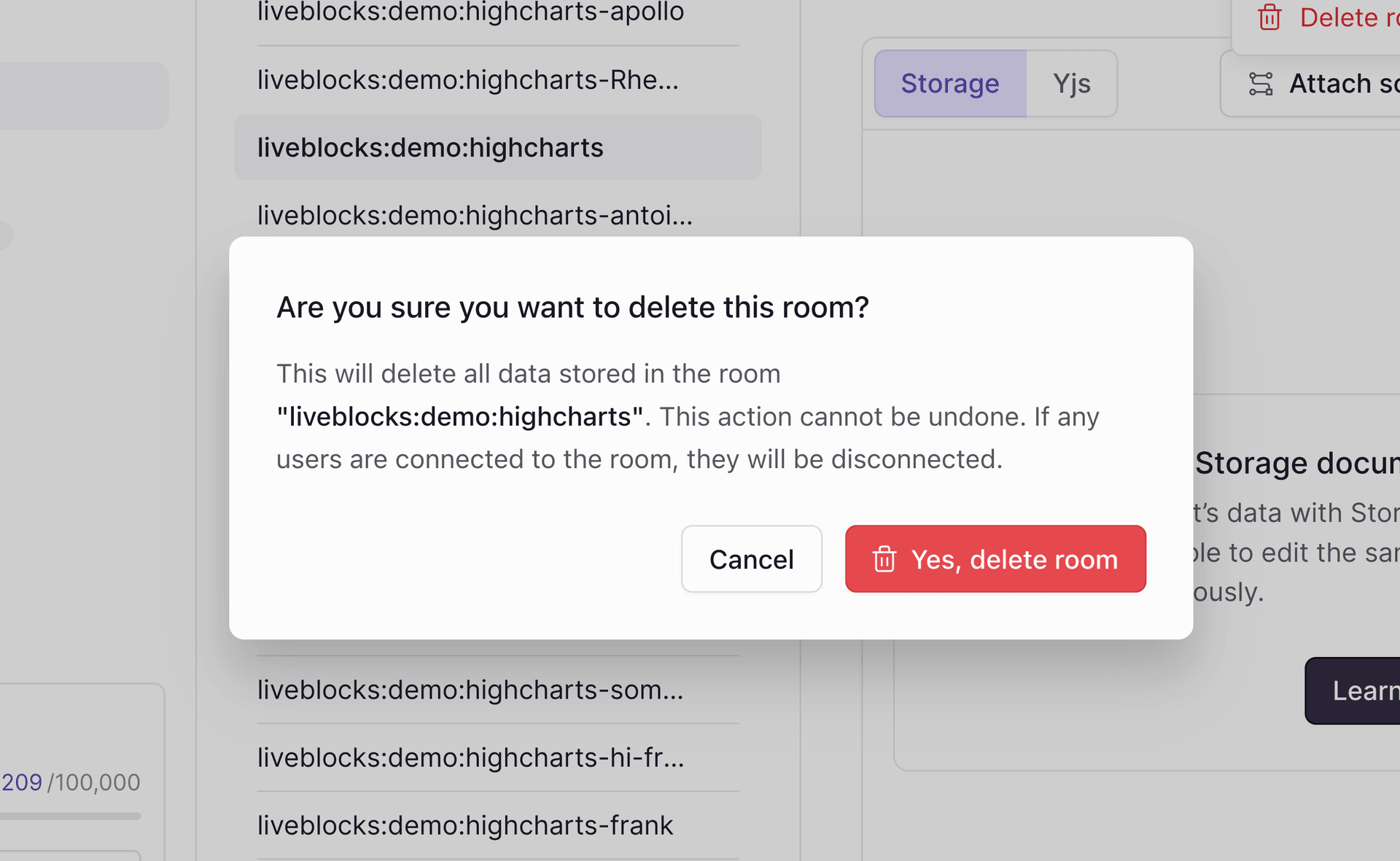
We’ve made a number of improvements to our dashboard, specifically to the rooms page. You can now search for rooms by their ID, sort them in various ways, and check how many users are currently connected to each room.

We’ve also made it possible to delete rooms directly from the dashboard.

We’re investing more into our dashboard, and we’ll have an update with further improvements next month.

Text editor components

We’ve added support for rendering Notion-like floating threads in Text Editor. This is a difficult feature to implement from scratch, but it’s now just a couple of lines of code with Liveblocks. We’ve created two different components that present threads in different ways.

Anchored Threads

AnchoredThreads displays your threads in a sidebar, positioning each alongside the text highlight it references. Threads never overlap, always stack in the correct order, and move next to the highlight when selected.

Anchored threads work especially well on large screens.

Floating Threads

FloatingThreads displays each thread below its text highlight. Floating threads automatically flip above the highlight when they’re too close to the bottom of the screen.

Floating threads work especially well on small screens.

Use them in combination

We generally recommend using both components in your text editor, showing floating threads on mobile, and anchored threads on desktop. Below we’re implementing this using Tailwind CSS, along with filtering out any resolved threads.

function ThreadOverlay() {  const { threads } = useThreads({ query: { resolved: false } });
return ( <> <FloatingThreads threads={threads} className="block w-[350px] md:hidden" /> <AnchoredThreads threads={threads} className="hidden w-[350px] sm:block" /> </> );}

Add your new component into your Lexical editor to use it.

<LexicalComposer initialConfig={initialConfig}>  <LiveblocksPlugin>    <ThreadOverlay />  </LiveblocksPlugin>  <RichTextPlugin contentEditable={<ContentEditable />} /></LexicalComposer>

Resolved thread changes

We’ve added a number of new ways to use resolved threads in Comments. Previously, resolving a thread was a custom metadata feature, but it now has first-class support, meaning we provide hooks, methods, and REST APIs for using it. It’s also become part of the thread object.

{  type: "thread",  id: "th_sf8s6sh...",  resolved: false,  // ...}

Below we’re creating a simple button that toggles the resolved status of a thread using the two new resolved hooks.

function ToggleResolve({ thread }) {  const resolve = useMarkThreadAsResolved();  const unresolve = useMarkThreadAsUnresolved();
if (thread.resolved) { return <button onClick={() => unresolve(thread.id)}>Unresolve</button>; }
return <button onClick={() => resolved(thread.id)}>Resolve</button>;}

For more information on the new hooks, learn more in our API reference:

  • useMarkThreadAsResolved
  • useMarkThreadAsUnresolved

We also have equivalent methods on the server:

  • liveblocks.deleteInboxNotification
  • liveblocks.deleteAllInboxNotifications

Custom links in Comments

Comments now allows you to create links with custom text by making selection and pasting in your URL.

You can also now paste rich-text content into comments, and its format will be preserved. Get started with a Comments example to try this.

Delete inbox notifications

Deleting inbox notifications is now possible using new hooks, methods, REST APIs, and directly in our notification components. You can see this below in our Comments Notifications example.

Here’s how to create a button that deletes all notifications for the current user.

function DeleteButton() {  const deleteAll = useDeleteAllInboxNotifications();
return <button onClick={deleteAll}>🗑️ Delete all</button>;}

For more information on the new hooks, learn more in our API reference:

  • useDeleteInboxNotification
  • useDeleteAllInboxNotifications

We also have equivalent methods on the server:

  • liveblocks.deleteInboxNotification
  • liveblocks.deleteAllInboxNotifications

Vanilla JavaScript support

Comments and Notifications are now available to use in vanilla JavaScript. Previously, these products were only supported through our React packages, but now a set of methods has been exposed enabling use in regular JavaScript.

// Fetch all threadsconst { threads } = await room.getThreads();
// Add a reaction to a commentconst reaction = await room.addReaction({ threadId: "th_xxx", commentId: "cm_xxx", emoji: "✅",});
// Fetch recent notificationsconst { inboxNotifications } = await client.getInboxNotificationsSince({ since: new Date("2024-08-06"),});

You can use these methods in any JavaScript framework, for example Angular, Svelte, or Vue as shown below.

<script setup>  import { ref, onMounted } from "vue";  import { room } from "./room";
const threadList = ref([]);
onMounted(async () => { const { threads } = await room.getThreads(); threadList.value = threads; });</script>
<template> <div v-for="thread in threadList" :key="thread.id"> <Avatar :userId="thread.comments[0].userId" /> {{ stringifyCommentBody(thread.comments[0].body) }} <a :href="...">View replies</a> </div></template>

Storage sync badge

Last month we made it easy to display a synchronizing/saved badge in your application with our new useStorageStatus hook, which lets you know if local Storage changes have been synchronized with our servers or not.

// "synchronizing" | "synchronized"const storageStatus = useStorageStatus();

However, because Storage often synchronizes in less than 50ms, this often results in a component that flickers in a distracting manner. We’ve added a new option to smooth out changes to prevent this happening. We’re using this option below to render a badge in our collaborative spreadsheet example.

We’ve implemented this by passing the smooth option to the hook.

function StorageStatusBadge() {  const storageStatus = useStorageStatus({ smooth: true });
return ( <div>{storageStatus === "synchronized" ? "✅ Saved" : "🔄 Saving"}</div> );}

Upgrade

To use the latest features, update your packages with the following command.

$npx create-liveblocks-app@latest --upgrade

If you were previously on Liveblocks 2.1 or below, make sure to follow our latest upgrade guide as there are breaking changes.

More information

This post is a summary of July’s changes, make sure to read our Changelog to learn about every change we’ve made, no matter how minor.

Contributors

Contributors include:guillaumesallesctnicholassugardariuspierrelevaillantnimeshnayajuofoucherotnviemarcbouchenoiredant2021jrownyflowflorentteddarificstevenfabre

13 authors